Map
PUQ Page Manager module WHMCS
The Map widget embeds an interactive OpenStreetMap into the page. You can set the geographic coordinates, zoom level, a marker title, and control the appearance of the map container. The map supports scroll-zoom toggle and an optional drop shadow.
Admin View
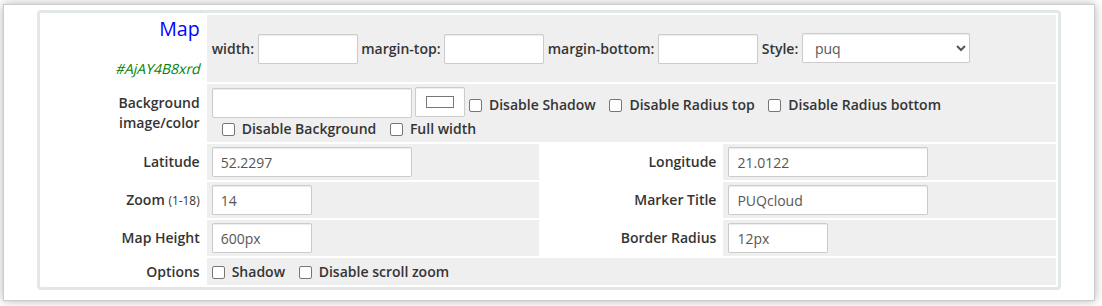 map-admin.png
Frontend View
map-frontend.png
Settings
Layout
| Setting |
Description |
| width |
Widget container width (e.g. 100%, 800px) |
| margin-top |
Top margin of the widget block |
| margin-bottom |
Bottom margin of the widget block |
| Style |
Visual style template (1 style available: puq) |
Background
| Setting |
Description |
| Background image |
URL of the background image for the widget container |
| Background color |
Background color of the widget container |
| Disable Shadow |
Remove the drop shadow from the widget container |
| Disable Radius top |
Remove top corner rounding |
| Disable Radius bottom |
Remove bottom corner rounding |
| Disable Background |
Remove the background panel entirely |
| Full width |
Stretch the widget to the full page width |
Map
| Setting |
Description |
| Latitude |
Geographic latitude of the map center (e.g. 52.2297) |
| Longitude |
Geographic longitude of the map center (e.g. 21.0122) |
| Zoom |
Initial zoom level, from 1 (world) to 18 (street level); default is 14 |
| Marker Title |
Tooltip text shown when hovering over the map marker |
| Map Height |
Height of the map iframe (e.g. 400px) |
| Border Radius |
Corner rounding of the map container (e.g. 12px) |
Options
| Setting |
Description |
| Shadow |
Add a drop shadow beneath the map |
| Disable scroll zoom |
Prevent the map from zooming when the user scrolls over it |
 Skip to main content